
Sherpa RoMEO AJAX Autocomplete
Depositing papers in an institutional repository usually requires manual entry of data into a web form by the depositor who is either an academic, clerical staff, or the repository manager. The next part of the workflow is for the item to then be validated by the repository manager, before being deposited into the repository.
What problems are there with manual entry?
The problem with manual entry of data by humans is that it leaves room for mistakes, typos and general incorrectness. Also manual entry is quite a laborious task. One textual section prone to mistakes is the publication details of an item. This section usually consists of a journal or publication title, an ISSN and the publisher. Getting these details correct is useful in knowing whether a paper can be deposited or not. Using a journal’s name as reference for looking up the publisher’s details for example a repository manager needs to know that the data is correct.
Can a paper be deposited in a repository?
Repository managers need to know whether copyright polices allow a paper to be deposited in to their institutional repository, or whether there is an embargo on the paper. If a paper can be deposited which version of the paper can they use? The pre-print or the post-print, or any other variation of the paper. Services such as Sherpa’s RoMEO have been created to give managers a tool for searching and retrieving such information.
The Sherpa RoMEO service is maintained by Sherpa and supported by JISC and the Wellcome Trust. It is a development that has grown out of the RoMEO project which aimed to produce a listing of journal publishers. The journal information is provided by the British Library’s Zetoc service which is hosted by MIMAS. Community contributions and Sherpa’s partners update the publisher information.
However even with services like RoMEO this still leaves the situation as it was before; manual entry of publisher information, being manual checked in RoMEO for any restrictions on an item. However there is now a better solution. AJAX autocompletion.
How it works:
- The user starts typing in the journal or publication title
- Local JavaScript sends the text via a http request to Sherpa RoMEO API
- RoEMO returns the results back encoded in XML
- Local xScript (either Perl or Java or other) parses the XML results
- Local JavaScript then displays the results and the user chooses correct title from them
- The publication section then gets filled in with correct data.
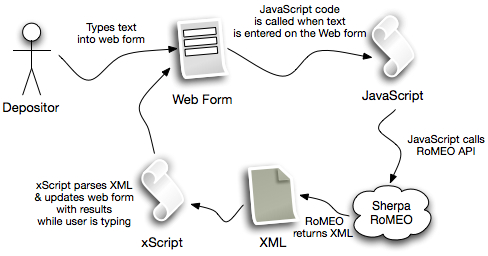
RoMEO API Lookup using AJAX
EPrints & DSpace
EPrints (current version 3.1.2) has built in autocomplete functionality using the http://script.aculo.us/ JavaScripts. DSpace (current version 1.5.1) currently does not have autocomplete included out of the box. There is a plugin http://wiki.dspace.org/index.php/Autosuggest_using_AJAX that (technical) users can install. Stuart Lewis is currently working on implementing autocomplete natively into DSPace.
Within the EPrints repository there are a couple of different approaches to autocompletion. One is what EPrints call authority lists, which are simply static files that site on the web server. http://wiki.eprints.org/w/Autocompletion_and_Authority_Files_(Romeo_Autocomplete)The EPrints autocomplete can search either the static authority lists or, functions that execute SQL queries. Using the authority lists can range from a simple implementation to a complex solution. EPrints users can also install a local version of the RoMEO database which it stores in an authority file. Using AJAX autocomplete, EPrints can look up the publisher information for a journal. However this data will need updating to add/remove publisher information as needed.
Another option is to use a Perl script http://lucas.ucs.ed.ac.uk/test/ajax-romeo.html by Ian Stuart at Edina. This is a Perl script which uses the Sherpa RoMEO API unlike the EPrints authority lists. Using the RoMEO API means that this method will have up-to-date publisher information. Installation of Ian’s script is very easy to do and instructions to do so are here http://wiki.iedemonstrator.org/confluence/display/ied/EPrints+Romeo+AJAX+lookup+widget
Why autocomplete is better?
An AJAX autocomplete form asynchronously requests data in the background without the need of submitting the page as is typical of most web forms. Therefore as the depositor types in the journal name or title the AJAX script requests a list of results from the Sherpa/Romeo database or the EPrints authority lists in ‘real time’.
If a depositor does not have JavaScript enabled in their web browser, the AJAX script will not load, therefore failing gracefully. Allowing the depositor to continue to enter the details manually.
Autocomplete is better as it allows the depositor to not have to look up the journal information separately in RoMEO while completing a deposit. Furthermore with manual entry user error can produce typos this method removes user error and should allow for faster more accurate deposits.
Related Posts
Tags
Share This





0 Comments
Trackbacks/Pingbacks